RAUM Academy: Your Free VR Collaboration Training Session
Your first step into professional VR collaboration – guided by experts, completely free.
RAUM Academy First Steps is a free, instructor-led training session for anyone new to the RAUM metaverse platform. In just 60 minutes, you’ll learn to navigate virtual environments, set up your avatar, and use collaboration tools – everything you need to host your first VR meeting or workshop. Sessions run twice weekly and are limited to 10 participants for personalized guidance.
Download the RAUM metaverse app to your Quest headset and reserve your spot.

Unleash the power of RAUM
and explore valuable insights!
Why Start Your VR Collaboration Journey with RAUM Academy?
RAUM Academy First Steps is designed for professionals who want to experience VR collaboration before rolling it out to their teams. In 60 minutes, you’ll move from VR beginner to confident user — learning to navigate immersive 3D workspaces, collaborate with spatial tools, and run your own virtual meetings.
Whether you’re an L&D manager exploring VR training, a team lead evaluating enterprise metaverse platforms, or simply curious about virtual reality collaboration, this session gives you hands-on experience with expert guidance.
What You’ll Learn in 60 Minutes
Guided by a RAUM team member, your Academy session covers:
Navigate VR Workspaces — Move through immersive 3D environments, teleport between locations, and orient yourself in RAUM’s collaboration spaces.
Set Up Your Avatar — Customize your RAUM FACES avatar with different looks, outfits, and styles for professional VR presence.
Use Collaboration Tools — Work with spatial whiteboards, sticky notes, 3D objects, and presentation screens — the tools teams use daily for VR meetings and workshops.
Understand Spatial Audio — Experience how spatial audio creates natural conversations where you can hear who’s nearby and move between groups — just like a real room.
Explore the Trial Workspace — Practice everything in RAUM’s self-learning environment so you can continue building skills after the session.
Sessions run twice weekly, limited to 10 participants for personalized guidance. You must have RAUM already downloaded on your Meta Quest headset before joining.
Is Academy First Steps Right for You?
Perfect for:
- Teams evaluating RAUM for enterprise collaboration
- Individual professionals new to VR/metaverse platforms
- L&D managers exploring virtual training environments
- Event organizers considering virtual conferences
You should already have:
- RAUM downloaded on your Meta Quest device
- 60 minutes of uninterrupted time
- Basic familiarity with VR headset controls
RAUM is used by valuable international brands
we value our community
and want to provide opportunities for networking, such as through club nights or open discussions on fire sides. These sessions can also be utilized for addressing the community and seeking their input.
value to our planet
vr from a sustainable perspective
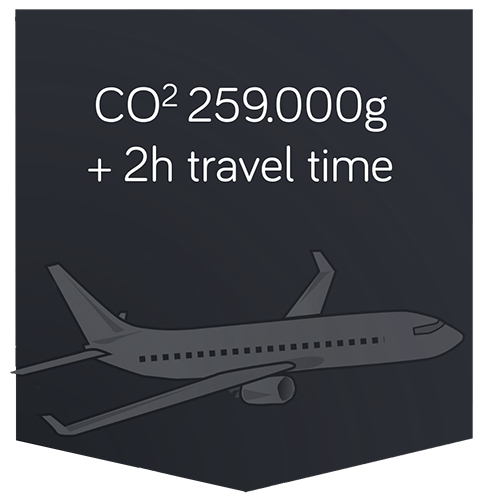
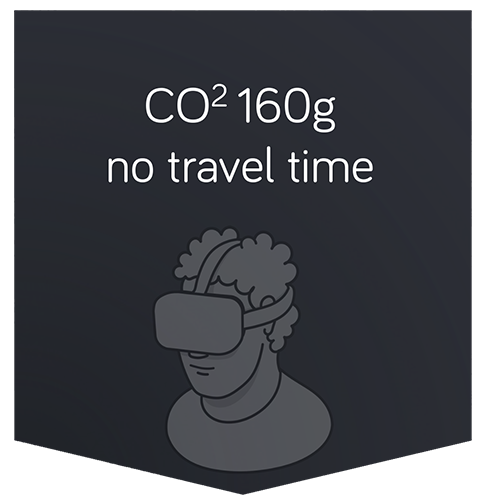
travel & emission example CGN to HAM and back (real life vs virtual reality)
save emission
By using VR for meetings and workshops, you save a lot of CO2 emissions
save costs
You don’t have to spend a lot of money to meet your team anywhere in the world at the same time

save time
Use your time effectively to work on your teamwork tasks
at the same time
Success Stories from Academy Graduates
ACADEMY – first steps
take your first steps and explore and learn how to use RAUM.
A roughly one-hour tour led by a member of RAUM, during which you will learn the basics of RAUM in our self-learning environment (like our trail workspace), allowing you to continue your education afterwards.
We hold sessions almost twice a week, you can register for a slot that works best for you. If you prefer a private session for your team, you can contact us to schedule a paid session.
Each session is limited to 10 participants. Please ensure that you have already downloaded RAUM on your device, as we do not provide support for this complimentary session.
If there is no available slot that works for you and your team, or if you need a different day and time, don’t hesitate to get in touch with our sales team for assistance. click here
Click here to check out our “Quick Start Guide” to prepare you for your first session at RAUM.
FAQ
any further questions about ACADEMY – first steps?
Is this Session for free ?
Yes, the “Academy – first step session” is free for you. In case you want to book a private session for you and your team at a specific time please contact the Sales Team to get get a quote and specify your demands.
What is the difference between "Academy - first step" and the "Genius" Programm ?
“Academy – first step” is a free offering which gives you a quick overview of how to navigate RAUM and an overview of the RAUM functions. In case you want to become an expert or the “go to” person in your organisation or for your client about RAUM, we have created the “Genius” program to offer you the right level of training to achieve these goals.
Which platforms are supported?
RAUM metaverse app APP is a VR device solution first and requires a VR device.
It is available for Meta Quest, Meta Quest 2 and Meta Quest Pro. Soon we will introduce cross-device support for the following VR headsets.
Mobile VR:
– Meta Quest
– Meta Quest 2
– Meta Quest for Business
– Meta Quest Pro
– Pico Neo 3 (soon)
– HTC Focus 3 (soon)
PC VR:
– Oculus Rift
– Steam VR
Where do I find some help?
You can find additional support on our helpcenter: click here
Additionally, you can find on youtube tutorials or small video snippets with the #kinderleicht.
Do your know our
ACADEMY – Genius Program?
The Genius program covers everything from fundamental concepts to leading and managing a team in the metaverse and strategies for successful virtual meetings and events. It allows you to gain hands-on experience and become a proficient user of RAUM through a guided curriculum led by experienced instructors and interactive group learning.